String tension meter
Know the real tension of your racket.
Measure your strings with your phone’s microphone, log every restring and follow how your tension changes.
Free download · 3 days of PRO free
Do you really know what’s happening to your strings?
- Day 0
You string at the tension you chose.
- From day one
The strings start losing tension.
- Weeks later
The feel changes. The racket stops responding the same way.
- Measurement
TensionDetails measures the real tension.
- Information
And you decide with data, not hunches.
Meet our ambassador,Javi Martí Hernanz
Former pro player · ATP & WTA coach

Javi Martí is a well-known name in tennis: a former player who now coaches professionals on both the ATP and WTA tours.
What many people don’t know is that, away from the court, Javi has spent years quietly testing the latest tennis gear. It’s a passion that’s part of his everyday life, always exploring, analysing and discovering everything the market has to offer.
That’s why joining TensionDetails was a natural step. Javi is our lead ambassador and the ideal person to support, present and help shape this project, bringing the experience and passion that have been with him all along.
Welcome, Javi!
The app
Everything about your strings, in one place.
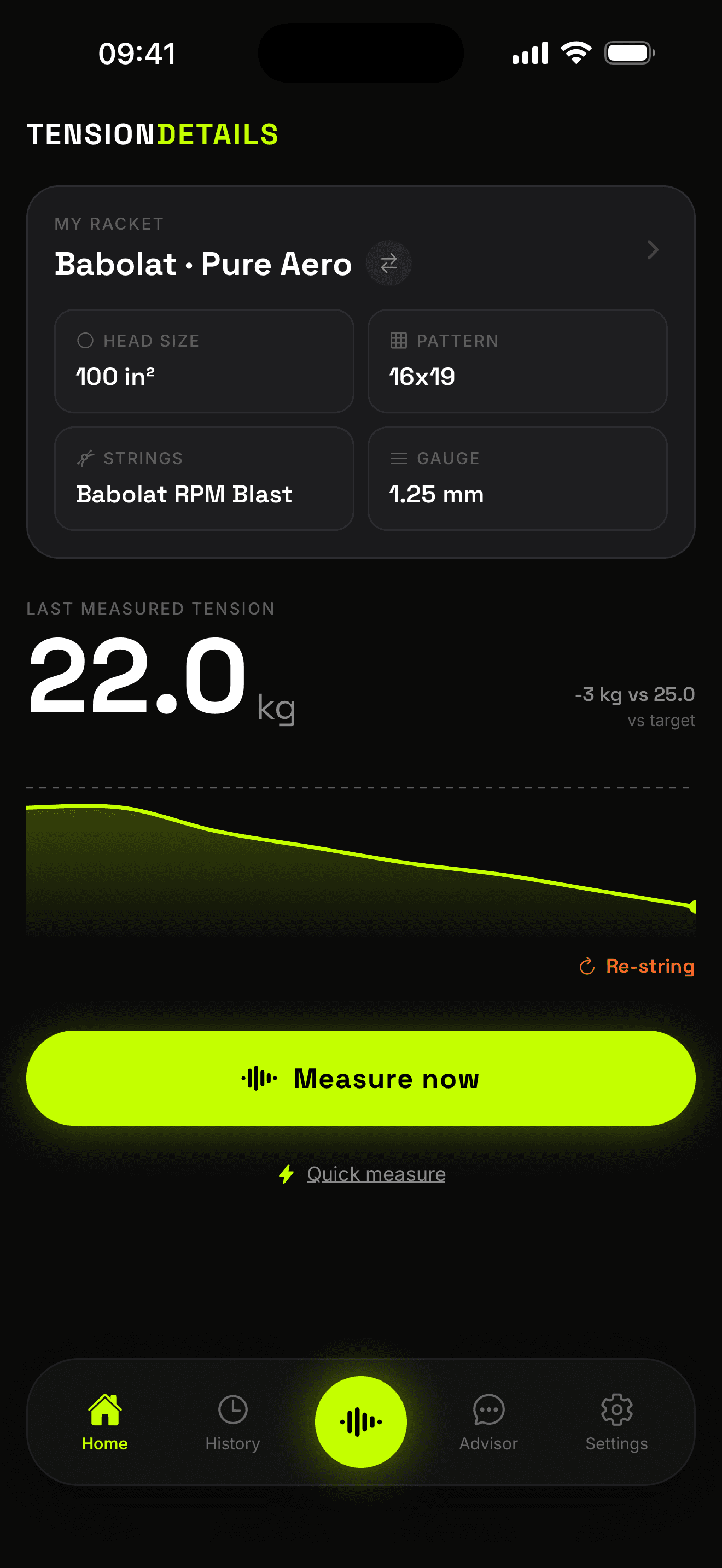
01Home
Your tension against your target, at a glance.
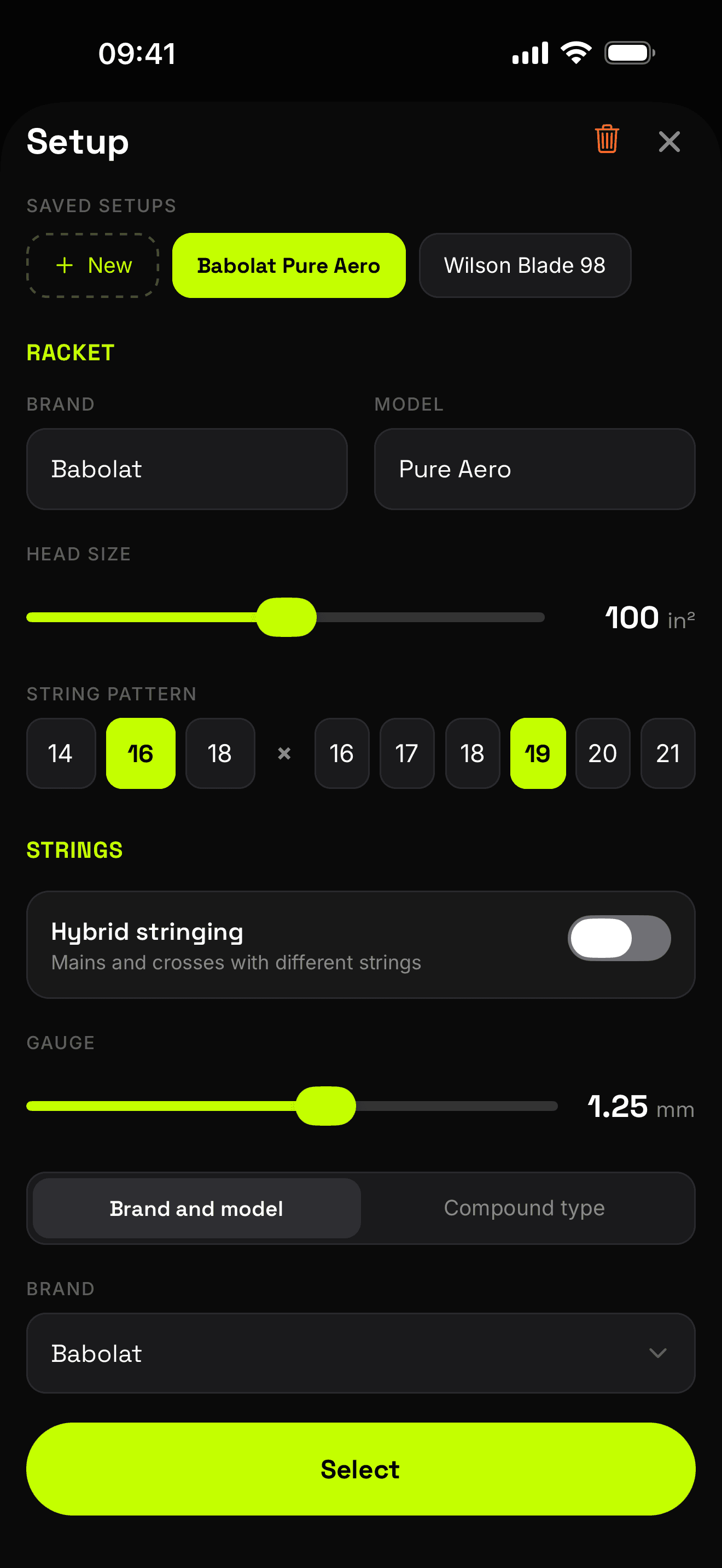
02Setup
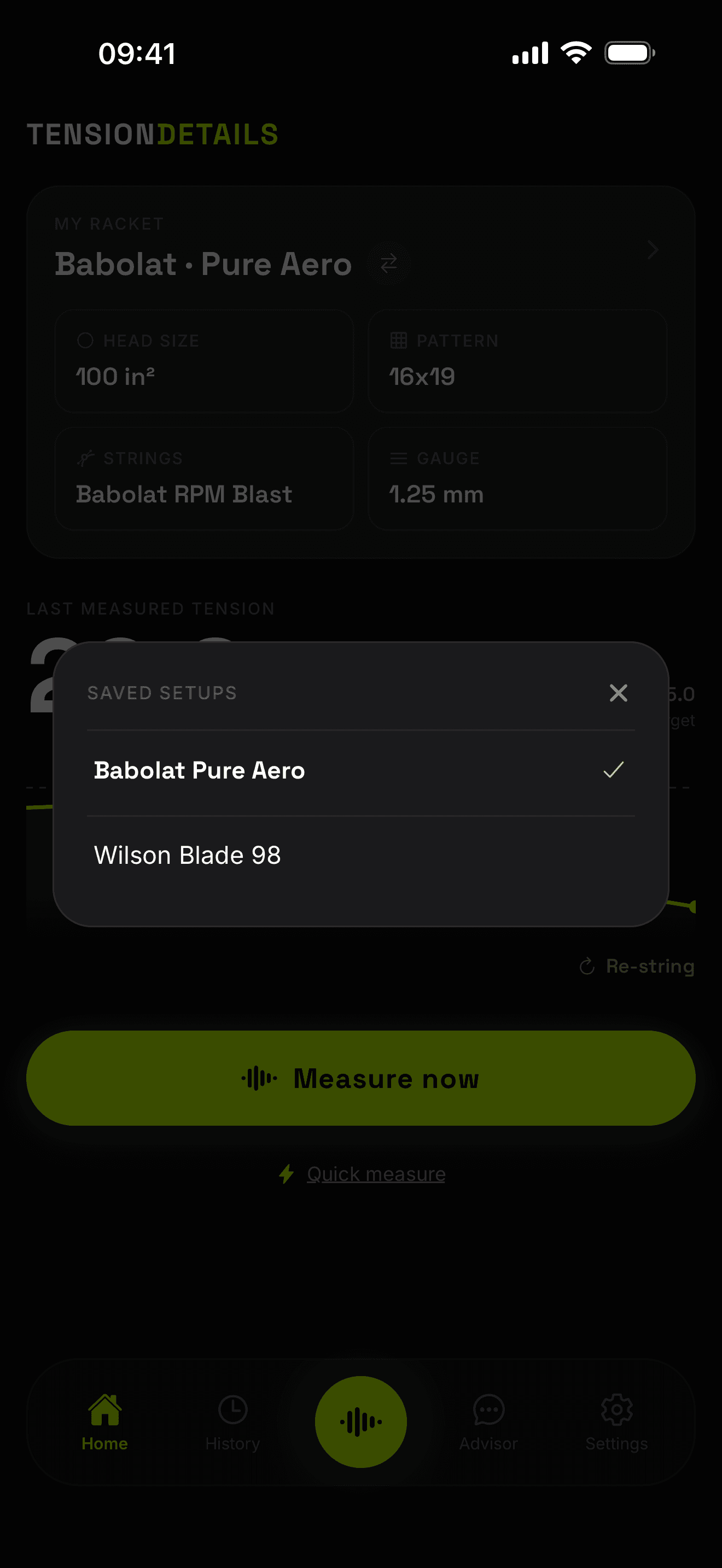
Racket, strings and target tension. Hybrids too.
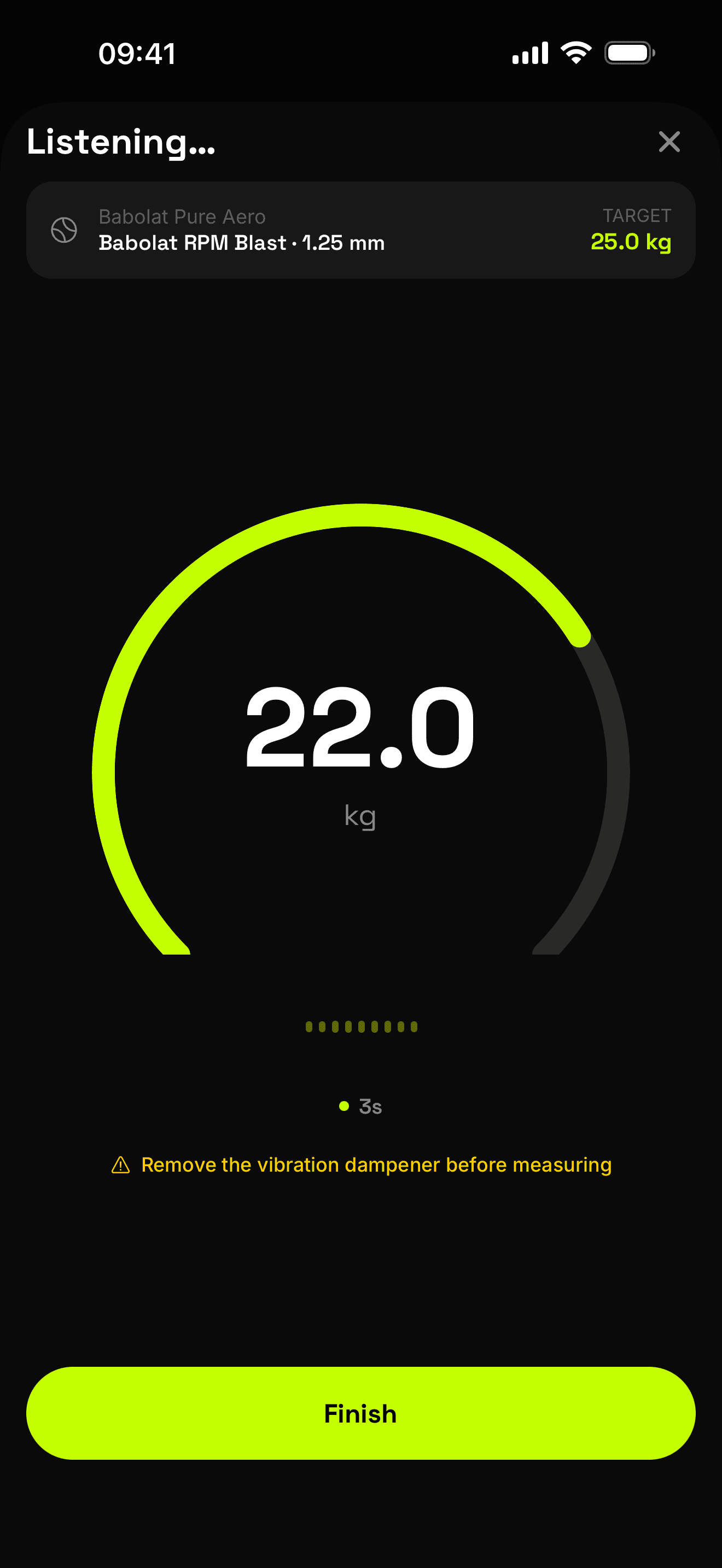
03Measure tension
Strike the strings and the app listens. No accessories.
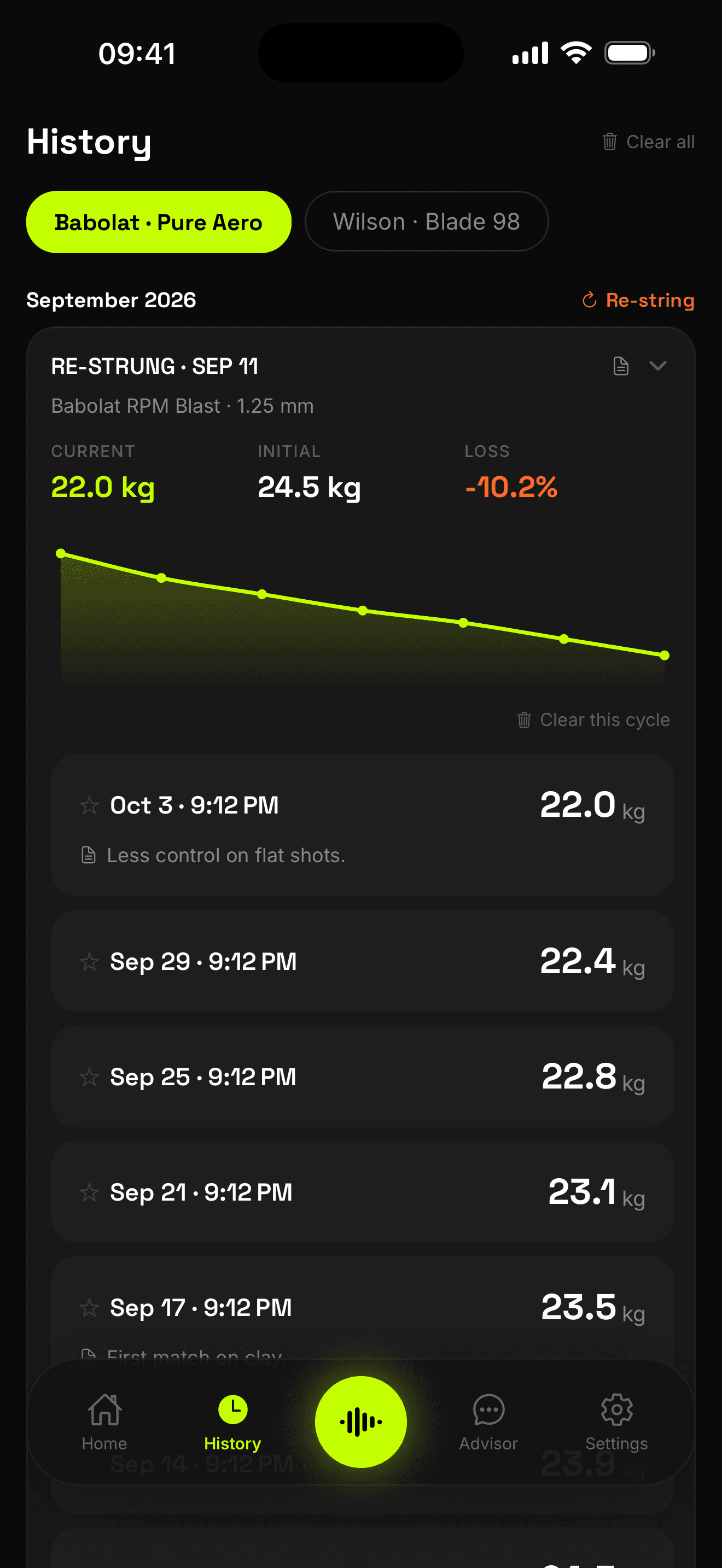
04History
How much tension each stringing loses.
How it works
From string to data.
01Racket
Pick your racket
Choose the racket and strings you’re about to measure.
02Measurement
Take the measurement
Strike the strings with the edge of another racket, near the microphone. A few hits, somewhere quiet.
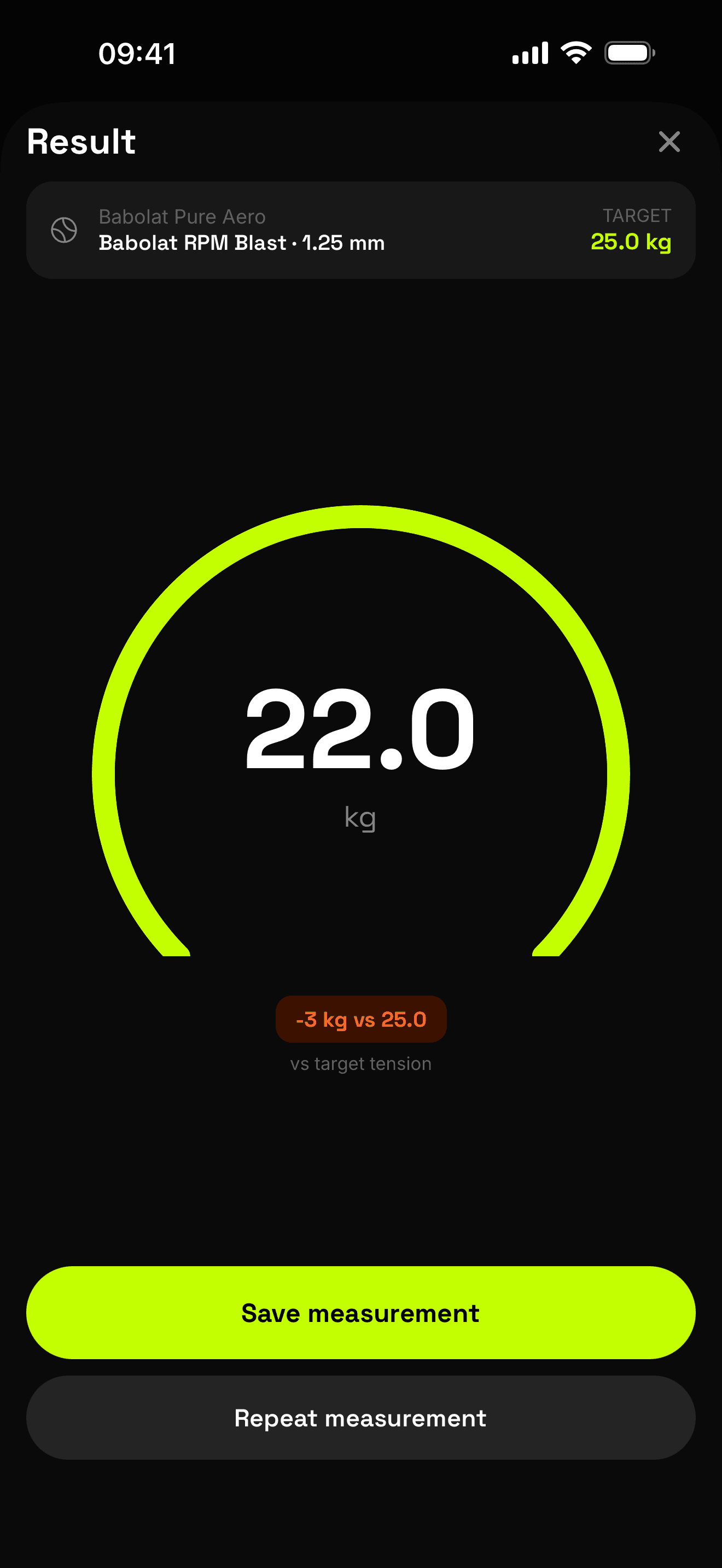
03Result
Get your tension
The app turns the vibration into tension and compares it with your target.
04History
Save the result
Every measurement is added to that stringing cycle’s history.
05Analysis
Understand the trend
See how your tension changes and ask TensionDetails AI whenever you need to.
Free to download on the App Store.
TensionDetails AI
Ask before you change.
An assistant specialised in tennis gear. It knows your rackets and strings, and answers about what actually affects your game.
Ask it about
- Strings
- Tension
- Setup changes
- Feel
- Performance
- Pro players
Hi! I'm your stringing advisor. I can help with tensions, string choice, restringing frequency, or any question about your setup. What can I help you with?
Is Luxilon 4G or ALU Power stiffer?
4G is the stiffer one.
- PRO
- 5 questions a month
- PRO + AI
- Unlimited questions
TensionDetails AI needs an internet connection and a subscription.
Discover TensionDetails AI(opens in a new tab)Plans
One plan to measure. One to understand.
The download is free, and the PRO plan includes a 3-day free trial.
| PROComplete measuring and tracking.€19.99/year€2.99/month≈ €1.67/month3 days free | PRO + AIIncludes TensionDetails AIEverything in PRO, with unlimited TensionDetails AI.€34.99/year€4.99/month≈ €2.92/month | |
|---|---|---|
| Unlimited measurements | Included | Included |
| Full history and notes | Included | Included |
| Restring reminders | Included | Included |
| TensionDetails AI | 5 questions/month | Unlimited |
Prices in euros, VAT included; they may vary by country. You subscribe inside the app, and the subscription renews automatically unless you cancel at least 24 hours before the end of the period, from your Apple ID settings.
Method
Physics, not guesswork.
Every hit makes your strings vibrate. TensionDetails measures that vibration and, together with the characteristics of your racket and strings, turns it into tension. It doesn’t guess: it calculates.
- HitVibrationEvery hit makes your strings vibrate.
- MeasurementYour phoneThe microphone measures that vibration.
- Tension22.0 kgTogether with your racket’s characteristics, it becomes tension.
A real measurement
The result comes from your strings, not from an estimate.
Built for your racket
Every measurement takes into account the racket and strings you set up.
A stable result
You measure with several hits so the reading is reliable.
No accessories
Just your phone’s microphone.
Works offline
Measuring doesn’t need internet.
Your data stays yours
Stored on your device. Cloud backup is optional.
Paid through Apple
Subscriptions managed from your Apple ID.
Measurements are a reference: their accuracy depends on correct racket and string data. They don’t replace a certified professional tension meter.
FAQ
Frequently asked questions
Can’t find your answer?Write to us
How it works
How does the app measure my string tension?
You strike the strings near your phone’s microphone. Thanks to the vibration of the string bed, the app measures the exact frequency your strings vibrate at and turns it into tension using physics and your racket and string data.
Do I need an internet connection to measure?
No. Measuring works fully offline. Only TensionDetails AI needs internet.
How accurate is the measurement?
It mostly depends on entering the right head size, pattern and strings. Picking your exact string brand and model, rather than a generic material, gives the most reliable reading. It’s a reference: it doesn’t replace a certified professional tension meter.
The app doesn’t detect my hits, or the measurement fails. What can I do?
Strike the strings firmly near the centre of the string bed, close to the microphone and somewhere quiet. Remove the vibration dampener first and leave a moment between hits: you need several consistent hits for a reliable reading.
Which devices are supported?
iPhone and iPad running iOS 16.4 or later. For now, TensionDetails is only available on the App Store.
Can I use the app on iPhone and iPad?
Yes. It works on both, with a layout adapted to each screen.
Subscription
What do PRO and PRO + AI Advisor include?
Both include unlimited measurements, full history with notes and restring reminders. PRO includes 5 TensionDetails AI questions a month; PRO + AI Advisor makes them unlimited.
How many free AI questions do I get?
With PRO you get 5 TensionDetails AI questions a month at no extra cost. With PRO + AI Advisor they’re unlimited. Without a subscription, the assistant isn’t available.
How does the free trial work?
The PRO plan includes a 3-day free trial. If you don’t cancel before it ends, the subscription starts automatically at the price of the billing period you chose. PRO + AI Advisor has no free trial.
How do I cancel my subscription?
Subscriptions are managed by Apple. Go to your iPhone’s Settings → your name → Subscriptions and cancel from there.
I’ve subscribed, but the app still shows the paywall. What do I do?
Tap “Restore purchase” on the subscription screen. It re-links your subscription to the app through your Apple ID.
If I upgrade from PRO to PRO + AI Advisor, do I pay for both?
No. Apple charges you for the new plan and automatically credits back the unused part of the old one. You never pay for both at once.
Data and privacy
Where is my data stored?
Your rackets, measurements and history are stored on your device. If you sign in with Apple, a backup is also kept in the cloud so you never lose your history. We don’t sell your data.
What happens to my data if I change phones?
If you signed in with Apple, sign in again on the new phone and your history comes back. It also carries over if you restore an iCloud or Finder backup. Your subscription is tied to your Apple ID: tap “Restore purchase” to get it back.
Rackets and strings
Can I log several rackets?
Yes. Save as many setups as you like and switch between them from the home screen. Each one keeps its own history.
Can I save different strings?
Yes. Each racket has its own strings, and you can use different strings for mains and crosses (hybrid stringing). If you restring with a different string, the history remembers which one each cycle used.
Which string types does the app support?
Monofilament, multifilament, natural gut and synthetic gut, plus a catalogue of specific brands and models.
Why does the AI advisor sometimes say it doesn’t know a string?
Because we’d rather tell you we don’t have reliable data than make up a recommendation. If a string isn’t in our catalogue or verified information, the advisor tells you honestly.
Know the tension.Understand your setup.Play with more information.
Download TensionDetails.
Scan to download it on your phone.